See if your opencode session is still working in ChromeOS Overview
Running opencode in a ChromeOS Crostini terminal, you have to keep switching back to the window to know if the agent is still working. Desktop notifications only tell you when something finishes. This post shows how to color-code the terminal window’s right edge so ChromeOS Overview tells you at a glance whether opencode is still busy: a thin colored bar appears on the right of the window.
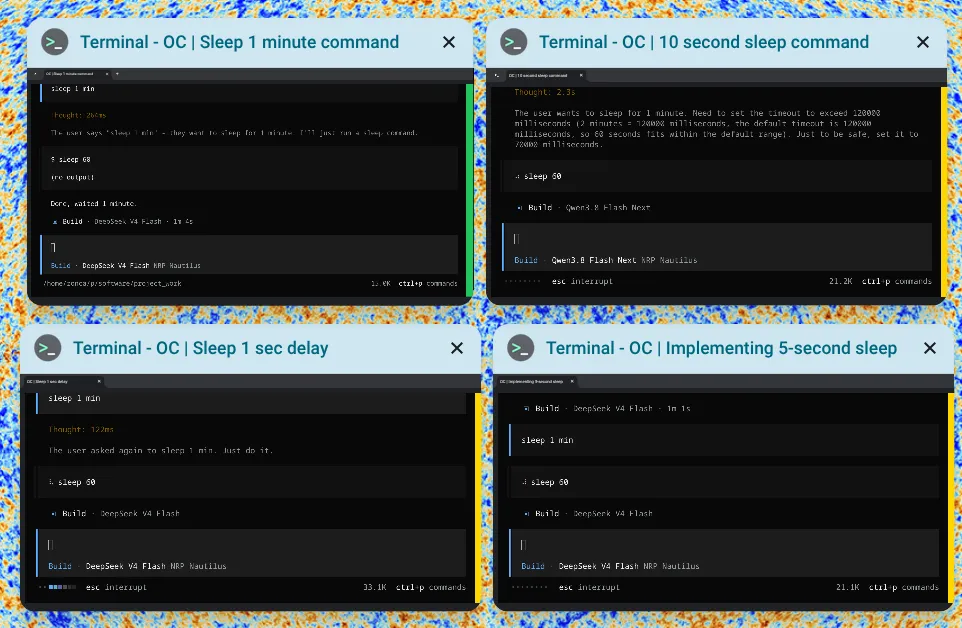
How it works
ChromeOS terminals use hterm, which supports two escape sequences:
OSC 11sets the default background colorOSC 111resets it to the terminal default
The opencode TUI paints its own dark screen, so the terminal background only shows through on the right margin of the window. That margin becomes the status bar: gold while the session is busy, green when the session becomes idle. In ChromeOS Overview the bar is clearly visible on the thumbnail, so you can scan all your opencode windows without switching to them.
Install the helper
A small bash script, agent-state, writes the right escape sequence to the host terminal. opencode runs hooks inside a server process that has no terminal attached, so the helper walks up the process tree to find the tty that launched the terminal window. The script is available in the gist:
curl -fsSL https://gist.githubusercontent.com/zonca/900fa78ad943a971485d1affad82f291/raw/agent-state -o ~/.local/bin/agent-state
chmod +x ~/.local/bin/agent-state
Usage: agent-state <working|done|waiting|error|reset> [agent-name]. Colors are configurable through AGENT_STATE_WORKING_COLOR, AGENT_STATE_DONE_COLOR, and AGENT_STATE_ERROR_COLOR.
The full source of agent-state and the opencode plugin are in this GitHub Gist:
Install the opencode plugin
opencode loads plugins from ~/.config/opencode/plugins/. Copy the second file of the gist, agent-status.js, into that directory, then restart opencode:
curl -fsSL https://gist.githubusercontent.com/zonca/900fa78ad943a971485d1affad82f291/raw/agent-status.js -o ~/.config/opencode/plugins/agent-status.js
mkdir -p ~/.config/opencode/plugins
The plugin listens to session events: while a session is busy the bar is gold, when it goes idle the bar turns green, and on a session error the bar turns red.
Reset the background when you quit opencode
When opencode exits, the shell takes over the window and the colored background would cover the whole terminal. Add a wrapper to ~/.bashrc so opencode resets the background when it quits:
opencode() { command opencode "$@"; agent-state reset; }Test it
- Restart opencode (so the plugin loads).
- Give it a task that takes a while, for example:
Run "sleep 15 && echo done" in your terminal. - Open ChromeOS Overview: the bar is gold while opencode works, and turns green when the session is idle again.
- Quit opencode: the window returns to the default black background.
The same helper can be wired to other agent CLIs through their own lifecycle hooks.