Correct a power spectrum by the instrument beam with healpy
Correct a power spectrum for the beam
If you are analyzing a map from an instrument with a specific beam width, you can correct the power spectrum by the smoothing factor caused by that beam and obtain a better approximation of the power spectrum of the orignal sky.
Load a map and its power spectrum
import healpy as hp
import numpy as np
import astropy.units as u
hp.disable_warnings()
m, h = hp.read_map(
"https://portal.nersc.gov/project/cmb/so_pysm_models_data/equatorial/dust_T_ns512.fits", h=True
)hp.mollview(m, min=0, max=1000, title="Dust map", unit="uK_RJ")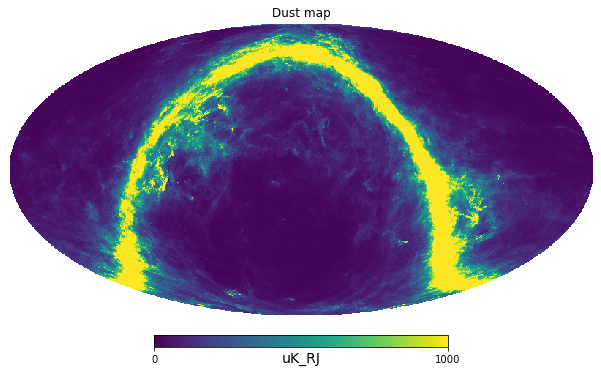
cl = hp.anafast(m)Smooth with the instrument beam
In this case we assume that the dust map from PySM is the true sky, then we apply a smoothing caused by the beam
beam = 30 * u.arcminm_smoothed = hp.smoothing(m, fwhm=beam.to_value(u.radian))cl_smoothed = hp.anafast(m_smoothed)Beam transfer function
We can get the transfer function of the beam, generally referred as :
bl = hp.gauss_beam(fwhm=beam.to_value(u.radian), lmax=len(cl)-1)import matplotlib.pyplot as pltplt.loglog(bl)
plt.title("Beam window function")
plt.xlabel("$\ell$");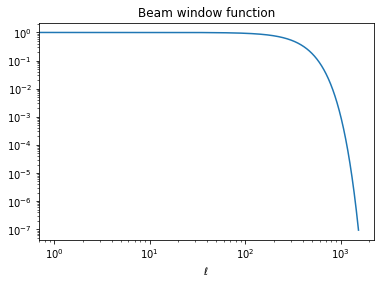
hp.mollview(m_smoothed, min=0, max=1000)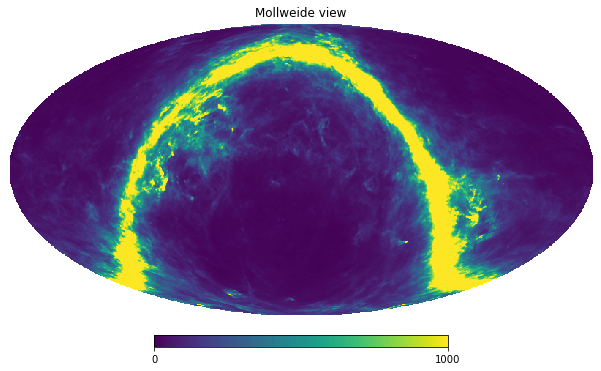
Recover the input power spectrum
We can recover the input as :
plt.style.use("seaborn-talk")
plt.loglog(cl, label="cl")
plt.plot(cl_smoothed, label="cl smoothed")
plt.plot(cl_smoothed/bl**2, label="cl smoothed corrected")
plt.xlim(1, len(cl)+100)
plt.axvline(1100, color="gray", ls="--", label="$\ell=1100$");
plt.legend()
plt.grid();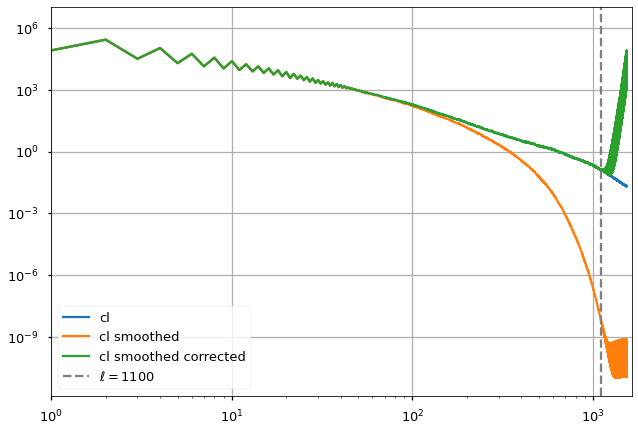
Limit the deconvolution before numerical error dominates
However, once the smoothed reach machine precision, there is no more signal left, the beam deconvolution then causes extra noise. We need to limit our analysis to a range of before the numerical error dominates, in this case for example, .